After a recent upgrade, connected to my 55” Hi Sense tv is
an Apple TV
A Roku
An Amazon fires tick
A tv set box from the local cable company
My tv only has 3 HDMI ports so I also have an HDMI switcher with its own remote control.
The Hi-sense tv remote also controls Vida (the Hi-sense built in OS and streaming/channel service last app).
The Roku is on a separate wifi network
The remote from the cable company only works by Bluetooth but the installer did say I can connect the setup to my Google account.
This means I have many remotes. Too many remotes! That’s ok for me because I’m teaching myself how to control everything through my Google and Apple home apps and my HomePod mini’s and Nest Audio speakers.
But, when I have guests over, I’d rather have one universal remote. I could provide a cheat sheet that says “to watch X program on Y device, push this button “. I see Logitech is no longer making Harmony devices. Any recommendations for alternatives?
I went a different route. I got rid of everything but the Apple TV, I use Amazon Prime Video on the ATV. I also didn’t bother getting cable, we just switched to Waipu.tv app on the Apple. That gets us all the normal satellite/cable channels. That means that I just need the Apple Remote, the remote for the TV is in the drawer under the TV and we got rid of all the other boxes connected to the tv.
Agree with David. Across all those devices, do any of those services you watch need the device, or could you consolidate all the apps onto one, making controlling them much simpler and freeing up your HDMI ports?
I actually went a step further and am currently using the TV OS on both our TVs Upstairs has a Tivo OS, which works well and gets regular updates, and the main TV is the Mozilla/Firefox OS. Both integrate well with the terrestrial TV service here in the UK.
Have you tried a Fire TV Cube? That tries to integrate with your cable service and any other receivers/soundbars you have, and claims to be able to control them all with either voice or their remote.
Haven’t tried the Fire Cube, I’ll have to do some research. Thanks for that tidbit .
I need at least 2 devices. Because I live in Canada, I need one of my devices on my VPN so it looks like I’m living in the States while I subscribe and watch any of the US based conglomerates/streaming services.
I have the cable box because there’s at least one Canadian national network who won’t let you stream without subscribing to a cable provider account.
I just bought the Apple TV last week as I’m starting to play around with the Apple Home stuff. So I finally broke down and paid for one. So I guess that’s a keeper.
My HiSense TV does have the Vida OS. I could see which of my services I can access through that OS. A lot of the more current televisions I have been looking at still only have 3 HDMI ports (probably because their OS offers some of the streaming services like buying a Roku TV). So, I don’t think upgrading my TV is a sensible option.
I might just end up storing my Fire Stick in a drawer.
I guess, also, I find it can be kind of fun (a challenge?) working with so many devices. Kind of a hobby I guess.
I was the same, had all the boxes, but lots of family complaints about remotes and HDMI confusion, so they’re all in the cupboard now!
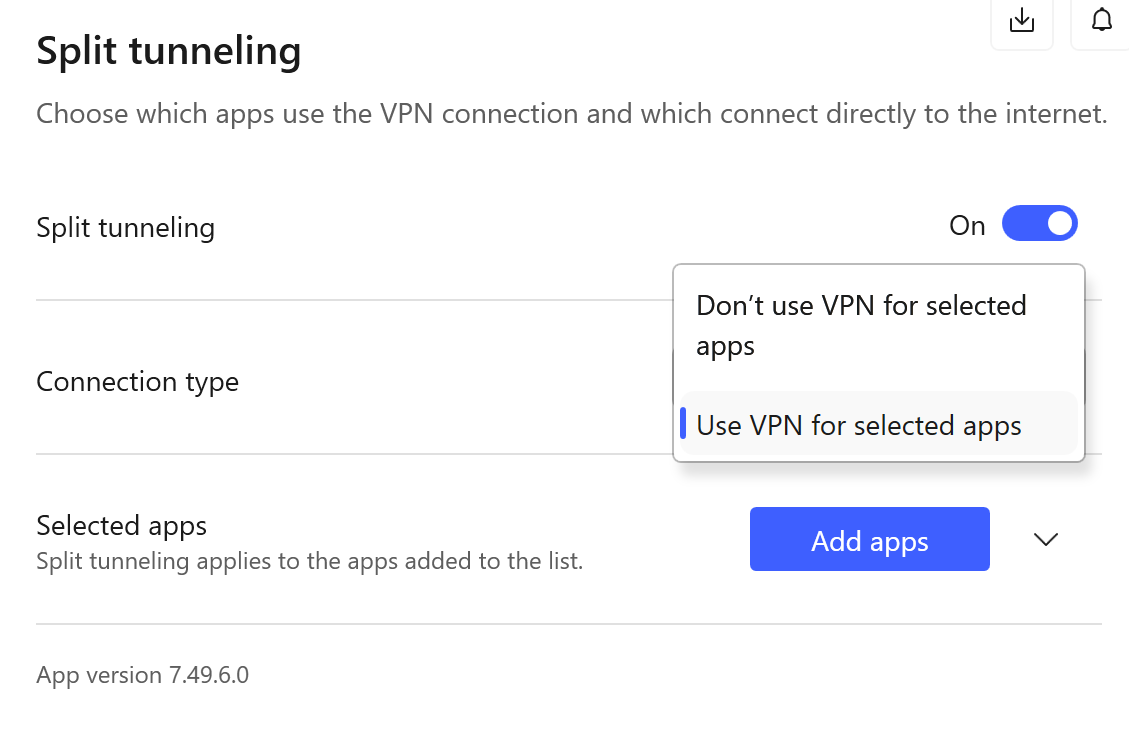
With the VPN and Canadian/US streaming services, does Fire TV support VPN split tunnelling like Android does? So on one device you could pick which apps think they are in the US.
As Jamez said, try VPN tunnel splitting. The Agile TV supports it, the service listed can do it, but you could check if the same method works with the Apple TV.
I know it is a bit dumb, if you are paying for cable, but can you stream the one network? Is it streamable, if you have the cable subscription? Using the Apple or Amazon devices to stream it would mean you don’t need the cable box, just the subscription, which simplifies things, even if it feels like a waste.
Great thinking -now that I have a subscription with the cable company, I should be able to use my cable company credentials to log on to the streaming app. Thanks.
Apple supports something called ‘Per-app VPN’. I’m going to have to do some research to see if that’s the same as split tunnelling VPN. And it seems my Fire Stick does support split tunnelling.
But since I only purchased my Apple TV a couple of weeks ago, it would be a shame to put it away in a cupboard. Maybe I can use it in my classroom for now (I’m a high school teacher).
I too am starting to look for a replacement for my Harmony. Unfortunately, all of my stuff is in the basement so I need one that supports RF. I also use a surround sound mixer, so my TV is just a monitor.
Good news everyone. I finally found an excellent Harmony Remote replacement. It’s called the SofaBaton. There’s 2 models. I chose the U2 which is the basic model but does everything I need. And the fancier X series.
The U2 can connect to devices via air and Bluetooth. You can create macros to run routines (ex turn on tv, move to this input, then run this channel). And you can reassign keys for one device to do an action on another device (ex when you are controlling your Roku, you can assign a key to change the volume on your tv.)

 Upstairs has a Tivo OS, which works well and gets regular updates, and the main TV is the Mozilla/Firefox OS. Both integrate well with the terrestrial TV service here in the UK.